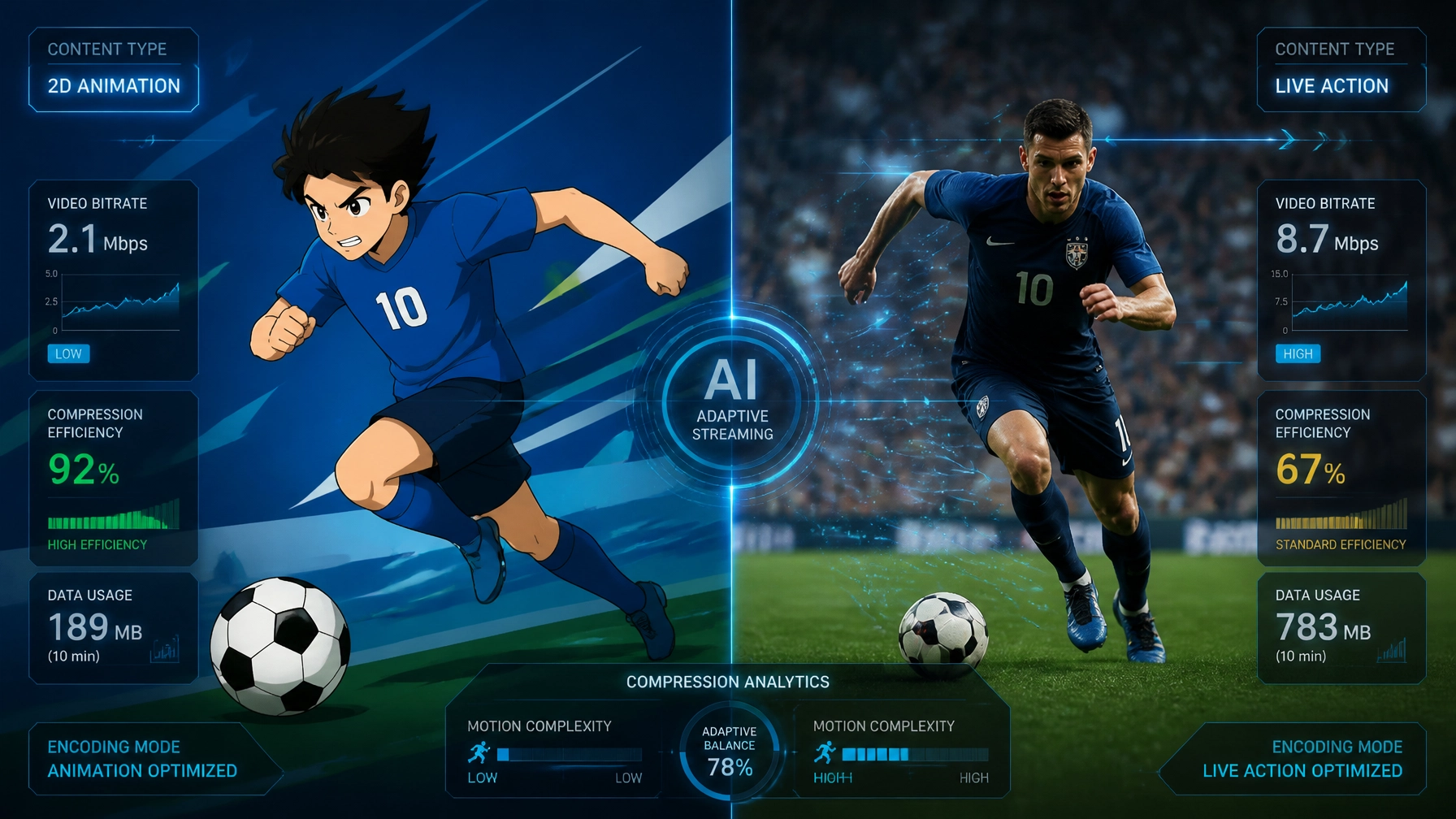
Have you ever wondered why a 1080p animated movie on Netflix looks crystal clear, but a live soccer match at the same resolution looks like a blurry mess of pixels during a fast play?
It’s not your internet acting up, and it’s not necessarily the streaming service being cheap. The reality is that not all pixels are created equal.
The efficiency of a video codec, the technology that shrinks video files so they can travel across the web, depends heavily on what it’s shrinking. At the Data Transmission Efficiency Alliance (DTEA), we spend a lot of time analyzing how different genres impact bandwidth. Whether you are a streaming giant or a data center manager, understanding these differences is the key to slashing costs without losing quality.
In this post, we’re diving into the "genre gap" and explaining why your codec treats a cartoon very differently than a Premier League game.
The Secret Sauce: Spatial and Temporal Redundancy
To understand why genres matter, you have to understand how codecs think. Codecs don't just "record" every pixel in every frame. If they did, a single movie would be several terabytes in size. Instead, they look for redundancy.
1. Spatial Redundancy (The "Copy-Paste" in a Single Frame)
Imagine a scene with a clear blue sky. Instead of saving the color data for every single pixel in that sky, the codec says, "Hey, this entire block of pixels is the exact same shade of blue." It saves one pixel and a set of instructions to "copy" it across the area. This is spatial redundancy.
2. Temporal Redundancy (The "Copy-Paste" Between Frames)
Most video frames are very similar to the ones before them. If a person is talking but the background is a static wall, the codec only needs to update the pixels for the person’s mouth and eyes. It "re-uses" the wall from the previous frame. This is temporal redundancy.

When a video has high redundancy, the codec is happy. When redundancy disappears: like in a fast-paced action scene: the codec has to work ten times harder, often resulting in those ugly "blocks" you see on screen.
2D Animation: The "Easy Mode" for Codecs
If codecs had a favorite genre, it would be 2D animation. Think The Simpsons, Rick and Morty, or classic Disney.
Why is it so efficient?
- Flat Colors: Animation uses large areas of identical color. This makes spatial redundancy incredibly high.
- Static Backgrounds: Often, the background in a cartoon doesn't move for several seconds while only a character's mouth moves. This is temporal redundancy heaven.
- Sharp Edges: Codecs love sharp, clean lines. They are much easier to mathematically define than the fuzzy, noisy textures of real-life skin or fabric.
Because of this, an animated show can look perfect at a bitrate that would make a live-action drama look like a grainy VHS tape. If you’re optimizing for animation, you can often push your compression much further than you think.
Talking Heads: The Corporate Workhorse
"Talking heads" refers to news anchors, interviewees, or your typical corporate webinar. These are the second most efficient content type for transmission.

In these videos, the camera is usually on a tripod (static), the background is fixed, and the only thing moving is a human face. Modern codecs like HEVC and AV1 are masters at identifying these static backgrounds and "locking" them in place.
However, "talking heads" can get tricky if there is camera noise. If you’re filming in a dark room with a cheap camera, the "grain" in the shadows moves constantly. The codec thinks that grain is "action" and tries to save it, wasting valuable bits on digital noise. This is why high-quality lighting actually makes your video more "compressible" and efficient.
Live Action & Cinema: The Middle Ground
When we move into movies and prestige TV, things get complicated.
Directors love film grain. To a codec, film grain is a nightmare. It’s essentially "random noise" that changes every single frame. Because it's random, there is zero temporal redundancy. The codec tries to preserve that grain, which eats up a massive amount of bandwidth.
Furthermore, cinema uses:
- Complex Textures: Think of a forest in The Witcher or a crowded street in Succession. Every leaf and cobblestone is a unique detail that the codec has to track.
- Motion Blur: Unlike the sharp edges of animation, live action has a lot of blur. This makes it harder for the codec to find "matching" blocks between frames.
For this type of content, streaming services have to strike a delicate balance. If they compress too much, they lose the "cinematic feel." If they compress too little, the buffering wheel of death appears.
Sports & Action: The "Final Boss" of Compression
This is where efficiency goes to die. Sports are the hardest possible thing to transmit efficiently.

Why is sports so difficult?
- Rapid Camera Pans: When a camera follows a football flying down the field, every single pixel in the frame is changing at once. The codec can’t "re-use" the background because the background is moving.
- Fine Texture (The Grass Problem): A field of grass is a codec's worst enemy. Thousands of tiny green blades, all moving slightly, create a visual complexity that requires a massive bitrate to keep sharp.
- High Frame Rates: Most sports are broadcast at 60 frames per second (fps) instead of the standard 24fps for movies. That’s more than double the data right off the bat.
When a codec runs out of "bit budget" during a sports game, it gives up on the fine details and starts grouping pixels into squares. This is called macroblocking, and it’s why the grass suddenly looks like green soup during a fast play.
How to Optimize Encoding Per Genre
You shouldn't use the same settings for a cartoon that you use for a basketball game. Here is how the pros at the DTEA recommend approaching optimization:
1. Use Codec "Tunes"
Most professional encoders (like x264 or x265) have built-in "tunes."
--tune animation: This tells the codec to prioritize sharp edges and flat colors.--tune film: This tells the codec to try and preserve grain and fine detail without turning it into a "smear."
2. Per-Title (and Per-Genre) Encoding
Netflix pioneered "Per-Title Encoding." Instead of having a fixed bitrate for all 1080p video, they analyze the content first. They might give an action movie 6 Mbps, but give an episode of BoJack Horseman only 1.5 Mbps. Both will look "perfect" to the viewer, but the animated show saves the company 75% in bandwidth costs.
3. Upgrade to AV1
If you are dealing with "hard" content like sports, the jump from H.264 to AV1 is massive. AV1 is designed with better motion-compensation tools that can handle those fast pans and complex textures much more efficiently.

Why DTEA Certification Matters
The world of data transmission is currently a bit of a "Wild West." One company claims their encoder is 50% more efficient, while another says theirs is the best for live sports. Without independent benchmarks, it’s all just marketing talk.
The Data Transmission Efficiency Alliance (DTEA) is changing that. We are establishing the first independent certification system for video compression. We set performance benchmarks for different content types, so you know exactly how a codec will perform on a 2D cartoon versus a 4K live soccer match.
By choosing DTEA-certified technologies, organizations can ensure they are using the most efficient tools for their specific genre, reducing their carbon footprint and their cloud egress bills.
Conclusion
Understanding the relationship between genre and codec performance isn't just for video engineers: it's for anyone looking to optimize the way we move data across the planet.
Whether you’re streaming the next hit anime or broadcasting the Super Bowl, remember: your codec is only as good as the instructions you give it. If you want to dive deeper into the world of data efficiency, check out our latest research at DTEA.org and see how we’re helping the industry set a new standard for transmission.
Ready to see how your tech stacks up? Learn more about our certification process here.